Find your perfect domain name with our guide, search tool & comparisons
As an essential part of your brand, your domain name should be one of the first decisions you make when starting a business, blog, or side project. It plays a role in how pusers find you, share your site, and even remember you.

TLD-list
Editor team
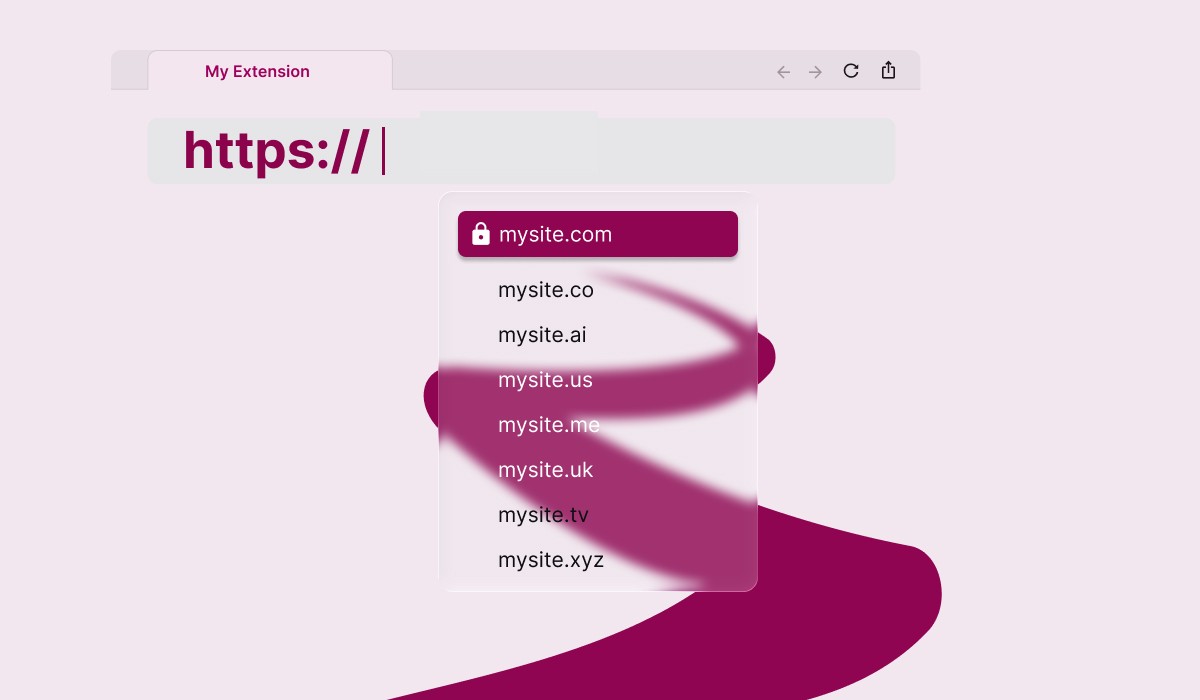
In line with our mission to give you the tools to make informed decisions, our advice is simple: understand the implications of choosing a domain, know the options available to you, and give the decision the thought it deserves. Doing so can save you headaches and money, down the line.
Understanding a domain name
Before you search for anything, it helps to know what you're looking at: what "buying" one really means, the parts it's built from, the different types you can register, and what happens after you hit "purchase," from day-to-day domain management to how you'd check domain status down the road.
What does it mean to buy a domain name
Unfortunately, nobody actually owns one outright. Not even Google. When you "buy" or "register" one, what you're really buying is the right to use it for a set period, plus the option to renew that right and keep using it for as long as you keep paying and following the rules.
That right comes from the TLD's registry, the organization that manages a given TLD (Verisign, for instance, runs .com), and you access it through a registrar: the retail storefront where you actually complete the purchase and whose records show you as the registrant. Registering one doesn't grant you a trademark, and it doesn't override one either. An available name can still infringe on someone else's registered trademark, and you can be forced to give it up even after you've paid for it. Our guide on what a domain name is breaks down how this leasing model works, what it costs, and what "ownership" really means in practice.
Domain name parts: Domain extension & SLD
It's mainly made up of two parts: the name you choose (the second-level domain, or SLD) and the extension that follows it (the top-level domain, or TLD). Put "example" and ".com" together, and you get example.com, a human-readable stand-in for the numeric address a computer actually uses. Explore more domain name examples to see how these parts come together in real-world addresses.
That's the core of it, but a full internet address, or URL, can have more parts than that: subdomains stacked in front of the SLD, plus the protocol and path that make up a complete web address. Some people call the SLD-plus-TLD combination the base domain, main domain, or root domain name, to distinguish it from any subdomain sitting in front of it. A subdomain like blog.example.com sits at the third level of the hierarchy, which is why it's sometimes called a third-level domain. If you want the full breakdown of how all of these pieces fit together, our guide to the different parts of a domain name covers subdomains and how a name becomes a working address in detail.
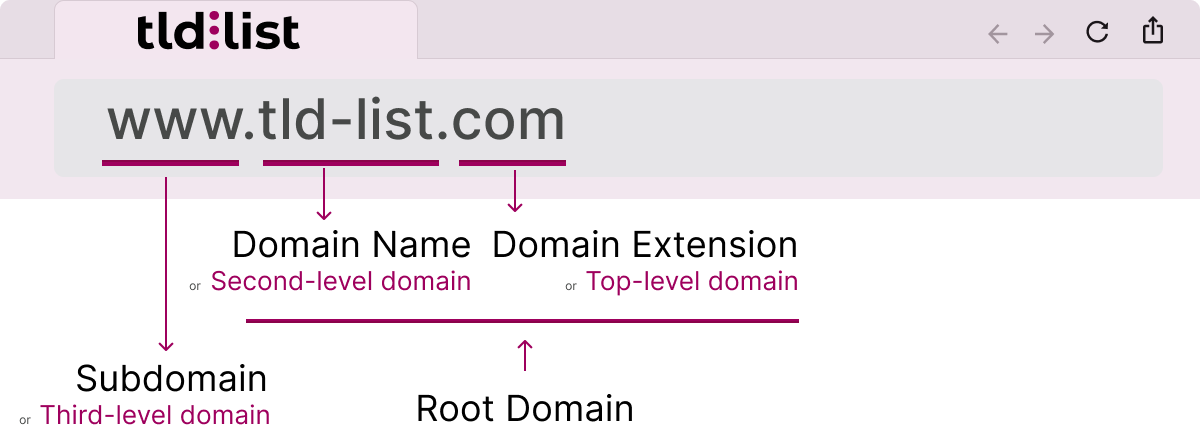
The domain name you register or SLD
The SLD is the part you actually choose and register: the "example" in example.com. It's not a free-for-all. It can only use letters (a-z), numbers (0-9), and hyphens, with no spaces and no underscores in a standard hostname. Each label (a segment between dots) is limited to 63 characters, and the whole address, every subdomain, the SLD, and the TLD together, can't exceed 255 characters. Names are also case-insensitive, so Example.com and example.com resolve to the exact same place. They can also be internationalized: IDN domains allow names to use non-Latin scripts through IDN encoding, though the lookup still resolves down to a standard ASCII string behind the scenes.
In practice, you'll want to stay far under those technical ceilings. Short, simple names are easier to type, say out loud, and remember. For the complete set of rules, character limits, and edge cases (including what a fully qualified name actually is), see our fully qualified domain name guide.
The domain extension or TLD
The TLD is the part of the address that comes after the final dot: .com, .org, .io, and thousands of others. More than 3,500 TLDs are available to register today, and they fall into a few broad categories.
- Generic top-level domains (gTLDs) — the original, unrestricted TLDs like .com, .net, and .org. .com is still the most recognized and most-registered TLD on the internet, and it remains the default trust signal for a general, global audience.
- Country code top-level domains (ccTLDs) — two-letter TLDs tied to a specific country, such as .us, .de, .uk, or .ca. Some are open to anyone; others require local presence to register. They're a strong signal for local and regional relevance, and registration policy varies by registry. Browse the full list of country-code TLDs to see which fit your market.
- New gTLDs — New generic top-level domains introduced from 2013 onward as ICANN expanded the namespace, now numbering over 1,200. This category includes industry-specific options like .io and .dev for tech, .app for mobile and web apps, and .shop for ecommerce. You can also check the release schedule for new top-level domains to see what’s coming next.
- Sponsored and restricted TLDs — names like .edu, .gov, and .mil, reserved for organizations that meet specific eligibility rules, which is exactly what makes them a strong trust signal when you see one.
You can also browse by category or letter, or explore the cheapest TLDs if keeping costs down is a priority. The full picture, every option's registration cost and renewal cost, lives on our domain extensions comparison page, where you can sort and filter all of them at once:
Domain name types
Beyond the SLD-and-TLD split, names are usually grouped by what kind of SLD they use or what kind of TLD they sit on, worth knowing before you start a domain search, since it shapes what you're actually looking for. Our guide to the types of domain names walks through each combination in more depth, with examples for each:
- By SLD, you'll typically see brand names (a made-up or company word, like stripe.com), exact-match names built directly around a keyword (like domains.com), keyword-brand hybrids that blend the two, and premium names: short, high-value SLDs a registry or a previous owner holds back to sell at a markup. The name you pick here does a lot of quiet work for your brand identity, and a memorable domain tends to win out over a clever one once people are typing it from memory rather than reading it off a business card.
- By TLD, the split mirrors the categories above: generic, country code, new gTLD, and sponsored. A .com used as a brand name behaves very differently, in cost and expectations, than a two-letter ccTLD used as an exact-match keyword name. Many domain owners settle on the SLD first and treat the TLD as the final decision once availability narrows things down.
The domain name search process
Finding the perfect domain for your project might start with availability and pricing, but it really should go way beyond that and become part of how you build your brand.
Try our domain name search
The fastest way to start is with our domain name search tool. Think of it as a checker with a full pricing engine built in. Search an SLD and a specific extension together to check availability instantly, or search the SLD alone to see, at a glance, which TLDs are open across the board. If the name you want is already registered on your first-choice TLD, the results point you toward related alternatives worth a look, so a taken .com doesn't have to be a dead end. And if you're drawing a blank on the name itself, a domain name generator can help spark variations worth checking.
The tool goes beyond a simple yes-or-no on availability, too. Once you've found an available domain, it compares registration and renewal prices for that name across TLDs and registrars side by side. You're not just checking whether something is free to register; you're seeing what it will actually cost this year and every year after.
How to choose a domain name beyond availability
It's tempting to treat "is it available" as the whole decision. Don't. This is one of the most durable choices you'll make for a business. It goes on business cards, in ads, in every email address your team sends, where your email domain becomes part of your professional identity. Ideally, it also outlives several redesigns and rebrands. Availability should be a small filter at the start of the process, not the deciding factor in finding the right domain name.
Once you have a shortlist of available options, weigh them against factors like:
| Factor | What to ask |
|---|---|
| Brand fit | Does it sound like your business, and does it reinforce the brand identity you're building? |
| Length & memorability | Is it short and simple enough that people can type it from memory? |
| Target audience | Would a ccTLD or a niche TLD resonate more than a generic one? |
| SEO | A keyword in the name carries little direct ranking weight with search engines — content and authority matter far more — but a clear, relevant choice still helps with click-through and recall. |
| Future flexibility | Will it still make sense if the business grows beyond its first product or market? |
| Trademark risk | Is your desired domain name already trademarked or closely associated with another brand? |
The best domain isn't always the most obvious one, and finding the right domain often means trading a little cleverness for a lot of clarity. Choosing well here saves you from a much more painful and disruptive rebrand later. And if you ever do need to move, a 301 redirect from the old address to the new one preserves most of the SEO value you've built. Our full guide on how to choose a domain name goes deep on every one of these factors, with real examples of naming strategies that work.
Register your domain name
Understanding the full domain name registration process up front helps you avoid surprises later. Once you've settled on a name, it's time to register it. On TLD-list, you can compare registration prices across every domain name registrar for your chosen SLD and TLD in seconds, but the sticker price shouldn't be the only thing you weigh.
The registration price is frequently a promotional, first-year-only rate, and domain promo codes can sometimes bring that initial cost down even further.. What matters more, long-term, is the renewal price: the amount you'll actually pay every year after that first one, which can run two to four times higher than the initial offer. It's also worth turning on auto-renewal the moment you register a new domain name. It's the simplest way to keep your domain active without a lapsed card or a missed email costing you the name. And if you manage more than one registration, think about how many registrars you're spreading them across. Concentrating too many registrations with a single provider tied to one payment method raises the risk that a single failed charge causes multiple renewals to lapse at once. Our guide to the domain registration process covers each of these steps, plus what to expect at checkout and just after.
What happens after you register a domain name
Registering one is really just the start. From the moment registration completes, it enters what's usually called its lifecycle: a set of phases that determines whether it stays active, lapses, or becomes available for someone else to register.
Every registration runs for a fixed term (from one to ten years) and needs to be renewed before that term's expiration to keep working. Miss a renewal and it typically moves through a grace period, then a more expensive redemption phase, before it's finally released back into the pool of available names. Our domain name life cycle article maps out every phase in detail, and our domain renewals guide covers exactly how and when to renew, what auto-renewal does, and how to avoid losing something you've already built a brand on.
Domain name glossary terms
These terms come with their own vocabulary, and a lot of it gets thrown around without much explanation. Here are the ones worth knowing, in plain language.
Domain Name System (DNS)
DNS is the internet's directory service. It translates the names people type (like example.com) into the numeric IP addresses computers actually use to find each other. Without DNS, you'd need to memorize a string of numbers for every site you wanted to visit. A lookup usually happens in a few quick steps: a browser checks its cache, then queries a DNS resolver, which works its way through a series of DNS servers (root, then the TLD's own servers, then the domain's name servers) until it finds a match. Most DNS lookups complete in milliseconds, even though each one is really a small round trip across the internet's infrastructure.
IP address
An IP address is the numeric identifier a device uses to find and communicate with another device on the internet: the actual "location" a name maps to. Traditional IPv4 addresses look like a short string of numbers separated by dots (192.0.2.1); the newer IPv6 addresses are longer, to accommodate the growing number of connected devices worldwide. Every domain ultimately resolves to one or more of these addresses through DNS.
Internet Domain Protocol
This is the "https://" (or, less often now, "http://") at the front of a web address, telling the browser how to talk to the server on the other end. It's not part of the name itself: you can drop it when you say an address out loud, and most browsers fill it in automatically, but it's technically the first piece of a full URL, followed by the domain and then the path to a specific page.
Name servers
Name servers are the servers that store a domain's DNS records and answer the lookups that make resolution work. When a browser needs to know where a domain lives, it queries those designated name servers, which respond with the details in its zone file: the record listing its IP address and other settings, such as mail or subdomain configuration. Name servers are typically provided by your registrar or your host, and delegating it to the right ones is what actually connects a registered name to a live site.
Naked domain name
This is just the address without the "www" prefix. example.com is naked; www.example.com isn't, but they're built from the same registration and usually meant to land on the same site. Most hosts set up a redirect between the two so visitors never notice the difference, but it's worth deciding on purpose which version you actually promote in ads and business cards.
Domain suffix
You'll sometimes see the TLD called a suffix, extension or web ending instead. Same concept, different name: the industry uses "TLD" and "suffix" fairly interchangeably, so don't read anything extra into whichever one a given source picks.
Domain registry
This is the wholesale operator behind a given extension, distinct from the registrar you actually buy from. Verisign, for instance, is the registry behind .com, and it's the true source of every registration and renewal fee a registrar passes on to you. Our deep dive on registries covers how that relationship actually works.
Domain registrar
A domain registrar is the company you actually register a name through: the retail interface between you and an extension's registry. Registrars are accredited to sell registrations, handle renewals, manage a WHOIS record, and process domain transfers when a registrant decides to move it to a different provider. Some registrars also sell hosting, email, and other add-ons, but the core job is the same everywhere: reserving your name on your behalf and keeping that reservation active for as long as you keep renewing it.
Domain transfer
Moving one from one registrar to another, usually to get better pricing or to consolidate several registrations under one account. It typically means removing any transfer lock at the current registrar and confirming the move with an authorization code sent to the registrant's email. Our guide to transfering domains walks through the process step by step.
Domain hosting
Domain hosting is the service that actually stores your site's files and makes them accessible on the web. It's separate from, but connected to, your registration: it points, via its name servers and DNS records, to your host's servers, so visitors who type it in land on the site your host is serving. You can register with one company and host your site with a completely different one; plenty of businesses do exactly that to get the best registrar pricing and the best hosting performance separately, rather than settling for one provider's version of both. Some web hosts sweeten the deal with a free domain for the first year, or a free SSL certificate bundled into every plan, but it's worth checking the renewal terms before you commit.
Domain alias
This is a second registered name set up to mirror a primary one, most often for email: it lets a business receive mail at both [email protected] and [email protected] without running two separate mailboxes, since it just forwards through to the same inbox. Businesses also use aliases for common misspellings or an old brand name, so someone typing the wrong one still lands in the right place.
Premium domain
Not every name sits idle waiting to be registered. This is a short, high-demand SLD that a registry, or a previous owner, holds back and prices well above standard registration, on the theory that a name in enough demand is worth more than a standard renewal fee. Our guide to premium pricing covers how registries and resellers actually set those prices.
This is a name that's already registered but not yet in active use, often showing placeholder ads or a "coming soon" page while the owner decides what to do with it. It's a normal, temporary state, not a red flag on its own, though a name parked for years can be a sign the owner is sitting on it hoping someone will buy them out. Our guide to parked pages covers what you can and can't do with one.
Expired domain
This is one that lapsed without renewal. It typically moves through a grace period, then either gets released back to the registry for anyone to grab, picked up through a backorder service queued up in advance, or sold off at public auction. Occasionally it lands with a squatter hoping the original owner will pay a premium to get it back. Our guides to backorders and auctions cover each path in more depth.
Whois domain
WHOIS is the public directory of who registered a given domain, traditionally listing the registrant's name, organization, and contact information alongside the registration and expiration dates. Because that record used to be fully public by default, most registrars now offer domain privacy, also called WHOIS privacy, which replaces your personal details in the public WHOIS record with the registrar's own forwarding information. In many regions this masking now happens automatically under privacy rules like GDPR, whether or not you paid for an add-on. It's a small setting, but it meaningfully cuts down on the spam and unwanted contact that comes with having one publicly tied to your name.
Cybersquatting
This means registering a name in bad faith, usually to resell it to a trademark holder at a markup or to profit off traffic meant for someone else's brand. Trademark holders have a formal way to fight back, too: the UDRP (Uniform Domain-Name Dispute-Resolution Policy), an ICANN process for reclaiming a name without going to court. It's one more reason the trademark check in picking the right name matters before you fall for an available option that isn't really yours to have.
Domain hijacking
This is different from squatting. Instead of registering an available name in bad faith, someone illegally seizes control of a name you already own, often through a compromised registrar account or a social-engineered support call. A transfer lock and strong, unique credentials on your registrar account are the best defenses against it.
The DNS root zone, ICANN & how TLDs get delegated
Zoom out from an individual domain's name servers and you reach the root zone database: the master file that lists every TLD and which servers are authoritative for it. That file defines the DNS root zone, sitting at the top level of the entire DNS hierarchy. Every registered address ultimately lives within this root zone of the domain name system, and a query for any TLD on earth traces back to it, arriving at one of thirteen sets of root servers distributed around the globe.
That root zone is managed by the Internet Corporation for Assigned Names and Numbers (ICANN), with technical functions like address allocation handled by the Internet Assigned Numbers Authority (IANA). ICANN delegates each TLD to a registry operator (Verisign runs .com, for example), and that delegation is what lets thousands of registrars sell domains through one consistent, authoritative system instead of a patchwork of competing directories. A handful of alternative DNS root systems have tried to offer an alternate root with extra, unofficial TLDs over the years, but almost no browser or ISP resolves against anything but the existing root. They've never gained real traction.
The rules that hold all of this together are written down in RFCs (Request for Comments) published through the Internet Engineering Task Force, and enforced with extra layers of protection like DNSSEC, which adds cryptographic verification to stop DNS records from being tampered with in transit. One small, easy-to-miss corner of the namespace, .arpa, is reserved exclusively for internet infrastructure and is never sold to registrants. It's sometimes called the infrastructure TLD, and its name is a nod to ARPANET, the telecommunications research network that predates the modern internet.
Frequently asked questions
Not outright. Registering one gives you the exclusive right to use it for your term, renewable for as long as you keep paying and stay within the rules that come with it, closer to a lease than an outright purchase.
A domain is just the address, like example.com. A URL is the complete address, including the protocol (https://), the domain, and often a path to a specific page, like https://example.com/blog.
Yes. Registration and hosting are separate services, and it's common to register with one provider and host your site with another, you just point the name servers at your host.
Use our domain name search tool to check a specific SLD-and-TLD combination, or search the name alone to see every TLD it's available on, along with registration and renewal pricing for each.
The short answer: Yes, it does. However, as an SEO consultant explains in our guide to the best extensions for SEO: Search engines don't rank a .com above a .io purely for being a .com; content quality, relevance, and authority carry far more weight. A ccTLD can help with local signals in its associated country, and a well-matched TLD can support recognition and trust with your audience, but the TLD itself isn't a ranking shortcut.
About the Author:

TLD-list
Editor team
Small crew of builders who believe a great idea should not be held back by a bad domain deal. We know this space inside out, from obscure new extensions to the registrar tricks that quietly inflate your renewal. We put that knowledge to work so you can spend less time worrying about domains and more time building the thing that matters.
Related Posts
How much does a domain name cost?
A standard domain name costs $10–$20/year, but the real number depends on your extension, registrar, and renewal price. This guide breaks down every factor, including premium domains, free options, and how to compare total costs accurately.
Read Full ArticleThe different types of domain names
A complete guide to the different types of domain: how domain names are structured (TLD, SLD, subdomain), every extension from .com and country-code TLDs to new gTLDs, and how to choose the right domain for your brand, budget and search visibility.
Read Full ArticleParts of a Domain Name
Learn the different parts of a domain name, including subdomains, second-level domains (SLDs), and top-level domains (TLDs). Understand how each component works, how they fit into a URL, and how to choose the right domain structure for branding, DNS, and SEO.
Read Full ArticleWhat is a fully qualified domain name?
Learn how FQDNs work, their structure, common uses, and how to find yours.
Read Full Article