- Internet Domains
- Domain Parts
- Sub domains
What is a subdomain? How subdomains work, examples, and how to find one
Subdomains are free to create, so adding one does not mean registering a domain name again. They use your domain's settings to route traffic to a specific server or service.

TLD-list
Editor team
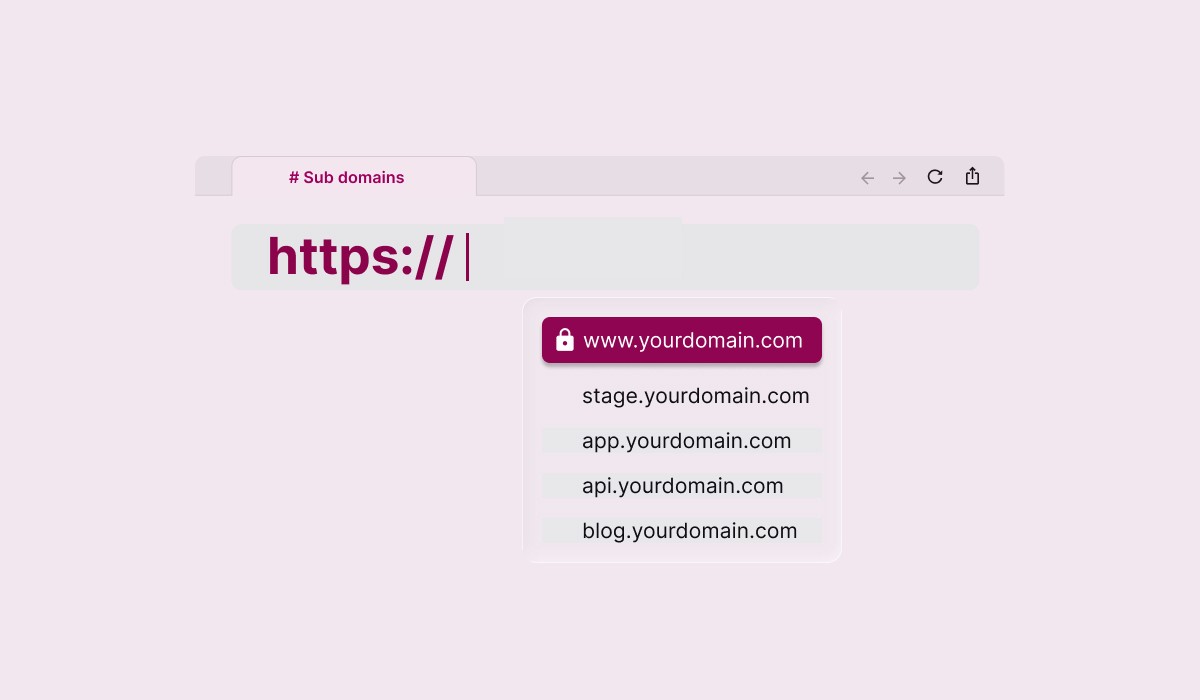
A subdomain is a prefix added to your domain name that creates a separate section of your website or a distinct web address. In blog.yoursite.com, "blog" is the subdomain, "yoursite" is the second-level domain, and ".com" is the top-level domain.
How subdomains work
As you can see a subdomain is a practical extension of a domain for splitting a site into different sections of a website without buying another domain.
Domain Name System (DNS) handles the lookup.
A subdomain is part of the URL structure that sits between the protocol and the domain. The full pattern is: protocol (https://) + subdomain + domain + TLD. So shop.example.com has "shop" as the subdomain operating under example.com. When someone enters a domain like this in a browser, the
The resolver queries the authoritative nameserver, which returns either an A record, pointing the subdomain directly to an IP address, or a CNAME record, which points it to a hostname that resolves to an IP. This DNS resolution is the same process that governs the main domain, and the subdomain simply gets its own entry in the DNS zone. Subdomains are created and managed through your domain's DNS settings, reached at your registrar or hosting provider. Each subdomain needs its own DNS record. DNS imposes no limit on the number of subdomains you can create, though practical limits come from server configuration and management complexity. DNS servers will resolve whatever subdomains you point at them. Propagation after creating a subdomain usually takes a few minutes, though it can take up to 48 hours depending on TTL (time-to-live) settings.
Common subdomain examples
Subdomains serve a wide range of purposes. The table below lists the most common prefixes and what they typically host:
 www.
www.Canonical website address (www.example.com), often a CNAME pointing to the root domain
 blog.
blog.Separate blog section, often hosted on a different platform (WordPress, Ghost)
 shop. / store.
E-commerce section using a separate platform (Shopify, WooCommerce)
 app.
app.Web application separate from the marketing site
 api.
api.API endpoints for developers and third-party integrations
 staging./ dev.
Test or development environment, not intended for public access
 support. / help.
Help center or support desk hosted on a third-party tool (Zendesk, Intercom, Tawk…)
 mail.
mail.Mail server reference used in server configurations (not typically a public URL)
 m.
m.Mobile version of a site: less common now that responsive design is standard
 docs.
docs.Technical documentation, often hosted on ReadTheDocs, Notion, or similar
When to use a subdomain
Subdomains are often used when part of your web presence needs to run independently from the main site. Common use cases include hosting a web app, an API, a multilingual version, a support portal, or a staging environment. In each of these you create a separate space that stays tied to your main domain. That is often the clearest reason to reach for one. Businesses also use subdomains to manage large or segmented sites: a media company might run different subdomains for each vertical, and a SaaS product might give every customer their own address on the same platform. Using subdomains this way keeps each function separate while the underlying domain structure stays intact. The decision usually comes down to whether the content is a distinct product (a good fit for a subdomain) or closely related material that belongs on the main site.
Subdomains vs. subdirectories: which is better for SEO?
The subdomain vs. subdirectory question comes up frequently when setting up a blog, help center, or e-commerce section. The practical choice comes down to technical setup and SEO consolidation goals, and because search engines can treat subdomains as separate websites, the two can send different ranking signals.
| Factor |
Subdomain (blog.example.com) |
Subdirectory (example.com/blog) |
|---|---|---|
| Domain authority |
Treated as a separate entity by some crawlers; link equity may not consolidate fully |
Inherits the main domain's authority directly; internal links pass equity |
| Technical setup |
Requires a DNS record; can run on a completely separate server or CMS |
Uses the same server and stack as the main site; simpler infrastructure |
| Platform flexibility |
Can run on a different CMS or hosting platform entirely |
Must be compatible with the main site's tech stack |
| SEO consolidation |
Link equity and topical signals may stay siloed from the main domain |
All signals consolidate under one domain — better for closely related content |
| Best for |
Distinct tools, apps, multilingual sites, or independent products |
Blog, news section, resources — any content closely related to the main site |
Google's official position is that subdomains and subdirectories are handled equally in search. In practice, many SEO professionals find that subdirectories rank faster for topically aligned content, because all link authority and crawl signals flow to one site rather than being divided across search engine results pages. Since some crawlers still treat a subdomain as separate, content on a subdomain may not always inherit the authority of your primary domain as directly. If the goal is to build topical authority for a content section like a blog or resource library, a subdirectory is often the safer choice. If the subdomain hosts a distinct web app, a multilingual version, or a third-party tool that cannot be embedded in the main CMS, a subdomain is the right call.
How to find subdomains with a subdomain finder
Sometimes you need to discover which subdomains exist for a domain, whether you are auditing your own site or researching a target domain. This is where subdomain finders help, also called a subdomain lookup or subdomain search tool. It returns the subdomains associated with a domain so you can see the full picture at a glance. Security teams and penetration testers run subdomain enumeration to enumerate subdomains of a domain and map its attack surface, because every subdomain is a potential entry point. The more of them that exist, the larger that attack surface. There are two broad approaches to subdomain discovery:
- Passive discovery pulls from public data such as certificate transparency logs (which record each SSL certificate issued for a hostname), reverse DNS, and search engines. It never touches the target directly.
- Active discovery uses brute force against a wordlist and other automated subdomain checks to surface hosts that are not listed publicly. Popular subdomain finder tools and enumeration tools include Subfinder, Amass, and crt.sh, plus Cloudflare's dashboard for domains you control. To find all subdomains for a site, you enter a domain into the tool and it compiles the discovered subdomains from these sources. An automated scan across a given domain can surface staging servers, forgotten apps, and other web addresses you may have lost track of, including specific subdomains you no longer remember creating. If the site is yours, reviewing this list of subdomains regularly is good hygiene, so retire anything unused before it can be exploited. If you are researching a site you do not own, only run a subdomain scan within the bounds of authorized testing.
How to create a subdomain
Creating a subdomain requires owning a registered custom domain and access to its DNS settings. No additional registration or fee is needed, so the result is a free subdomain of the domain you already own. The process is the same at any domain registrar or DNS provider:
- Access your DNS settings. Log in to your domain registrar or DNS provider and open the DNS management panel for your existing domain.
- Add a new DNS record. Create an A record (to point the subdomain to an IP address) or a CNAME record (to point it to another hostname). The record name is the subdomain name, for example "blog" to create blog.yoursite.com.
- Configure your server or platform. Set up the server or hosting platform to respond to requests for that subdomain. If you use a third-party tool, follow its documentation for connecting a custom subdomain.
- Wait for propagation. Changes usually take effect within minutes but can take up to 48 hours to propagate fully. Once the record is active and your server is configured, the subdomain is live. You can add subdomains the same way whenever new needs arise, and verify each one by visiting its URL or running a lookup with tools like dig or nslookup.
SSL certificates for subdomains
HTTPS on a subdomain requires an SSL certificate that explicitly covers that subdomain. A standard single-domain SSL certificate issued for example.com does not automatically extend to blog.example.com, because those are treated as distinct hostnames. There are two practical options. A wildcard SSL certificate (*.example.com) covers all first-level subdomains under the main domain name with a single certificate, which is cost-effective when you run multiple subdomains. A single-domain certificate can be issued for a specific subdomain separately if you only need HTTPS on one. Most modern hosting providers and platforms, including Cloudflare, handle SSL automatically via Let's Encrypt, which issues free wildcard certificates. If your platform manages SSL for you, certificates for a new subdomain are typically provisioned automatically. If you manage your own server, you will need to generate and renew the certificate manually or set up automated renewal.
Frequently Asked Questions
Yes. Creating a subdomain does not require registering a domain name again, so the subdomain itself is free. You create subdomains through your domain's DNS settings at no additional registration cost. You may have platform or hosting costs depending on what you use the subdomain to host, but the subdomain adds nothing to your registration bill.
Subdomains do not inherently hurt SEO. Search engines can crawl and index subdomain content. However, because subdomains can be treated as separate websites, that content may not inherit the main domain's link authority as directly as a subdirectory would. If your goal is to consolidate SEO signals for a blog or resource section, a subdirectory is often more reliable. A subdomain is the right option when the content is truly a separate product or application.
There is no technical limit on the number of subdomains you can create under a domain. Each subdomain requires its own DNS record, and each may need its own server or hosting configuration. Practical limits come from server setup and management overhead, not from DNS itself.
A domain (also called a root domain or apex domain) is the registered name you own, such as example.com. A subdomain is a prefix added to that domain, such as blog.example.com or app.example.com. You must register a domain before you can create subdomains within it. Subdomains do not require separate registration and have no expiration date of their own, so they exist as long as it is registered and the DNS record is in place.
A subdomain (blog.example.com) is a separate DNS entry that can point to a completely different server or platform. A subdirectory (example.com/blog) is a path within the same domain, served from the same server. Subdirectories consolidate all SEO signals under one domain, while subdomains can separate content into independent sections with their own hosting.
Before you register the domain you'll use for your subdomains, compare domain registration and renewal prices across all major registrars at tld-list.com. Find and compare prices at tld-list.com to get started.
About the Author:

TLD-list
Editor team
Small crew of builders who believe a great idea should not be held back by a bad domain deal. We know this space inside out, from obscure new extensions to the registrar tricks that quietly inflate your renewal. We put that knowledge to work so you can spend less time worrying about domains and more time building the thing that matters.
Related Posts
How much does a domain name cost?
A standard domain name costs $10–$20/year, but the real number depends on your extension, registrar, and renewal price. This guide breaks down every factor, including premium domains, free options, and how to compare total costs accurately.
Read Full ArticleThe different types of domain names
A complete guide to the different types of domain: how domain names are structured (TLD, SLD, subdomain), every extension from .com and country-code TLDs to new gTLDs, and how to choose the right domain for your brand, budget and search visibility.
Read Full ArticleParts of a Domain Name
Learn the different parts of a domain name, including subdomains, second-level domains (SLDs), and top-level domains (TLDs). Understand how each component works, how they fit into a URL, and how to choose the right domain structure for branding, DNS, and SEO.
Read Full ArticleWhat is a fully qualified domain name?
Learn how FQDNs work, their structure, common uses, and how to find yours.
Read Full Article