Custom Filters
Find what you are looking for faster
The filtering system in our tables lets you refine domain search results and data views to match exactly what you’re looking for. Using these filters, you can narrow large datasets down to the domains that actually matter to you:

The search bar at the top allows you to check whether a specific domain name is available. You can also use it to explore extensions directly, just type a TLD (for example, .dev or .ai) or a full domain name (such as example.dev) to see its availability and pricing across registrars.

This dropdown lets you filter extensions by their intended purpose or audience, such as business, technology, or education. These categories are shared with our TLD categories page, so the classification stays consistent across the site.

The Filters dropdown gives you more control over how TLDs are displayed:
- TLDs with prices only: Show only extensions with tracked pricing and active promotions.
- Cheapest registration price: Use the slider to limit results to a specific price range.
- TLD type: Filter by gTLD, ccTLD, IDN, grTLD, sTLD, or infrastructure domains.
- Domain level: Choose whether to display top-level, second-level, or third-level domains.
Our vision for the future of custom filters
Our goal is to validate the demand for a more advanced filtering system: one that allows users to include or exclude data from specific registrars and save filtering preferences for easy switching between different views and use cases.
The previous version of TLD-List included a feature called Custom Filters. This functionality belonged to the legacy platform, which has since been deprecated. As a result, users can no longer log in to access, edit, or reuse previously saved filters.
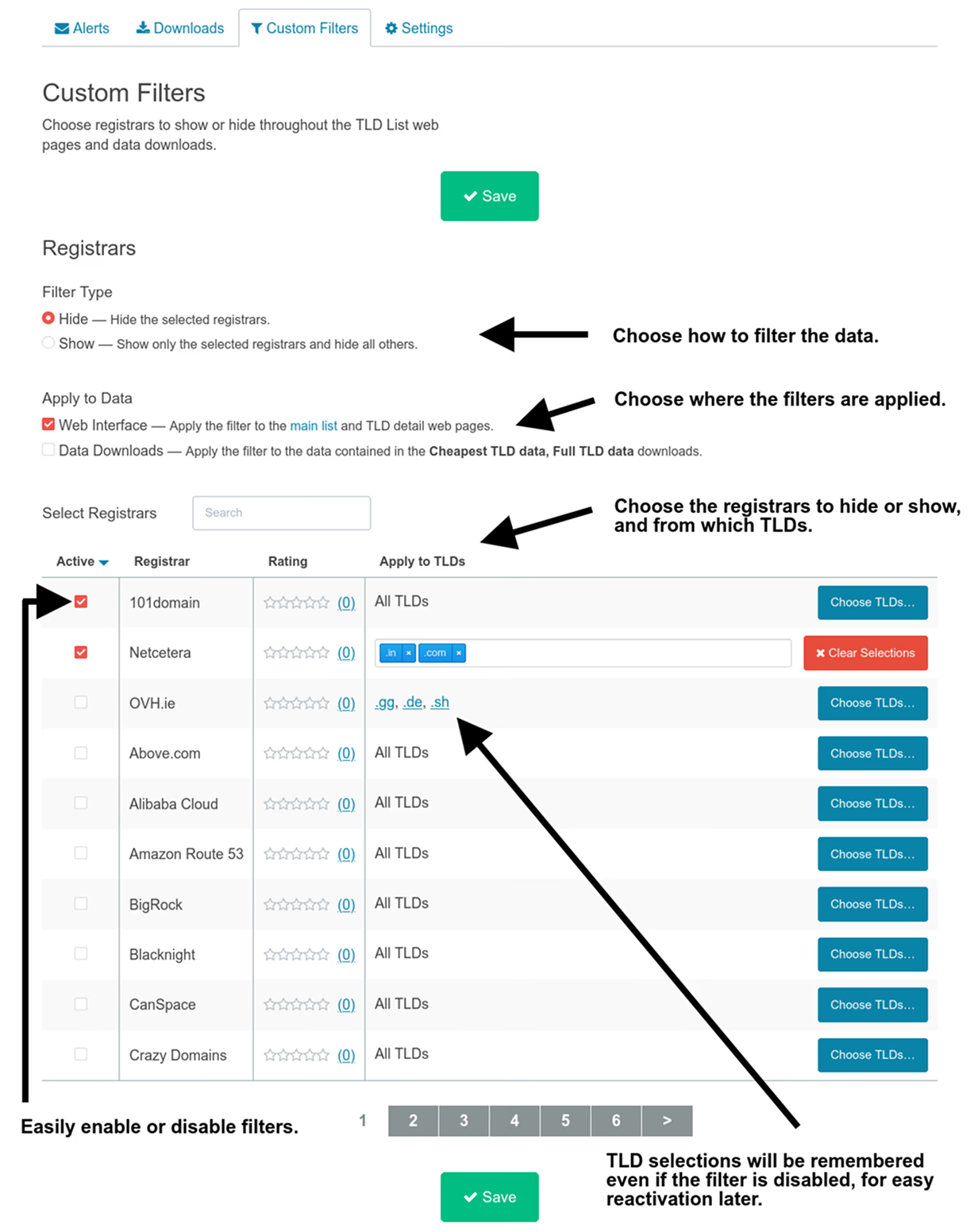
Custom Filters allowed users to tailor TLD-List to their preferences by controlling which registrars appeared across the interface and exported datasets. Users could hide specific registrars entirely or restrict results to only the registrars they cared about.
These filters applied consistently across multiple areas of the platform, including the main list view, individual TLD detail pages, and both the Cheapest TLD and Full TLD data downloads. The system also supported granular rules at the TLD level. For example, a user could hide BigRock for .in only, or exclude OVH.ie from .gg, .de, and .sh while leaving it visible elsewhere. This made it possible to build highly specific, use-case-driven views of the data.
Notes from the previous version
- Users needed to be logged in for custom filters to apply across TLD-List web pages.
- Custom filters did not work with price history data or alert features.
- After updating filters, changes could take up to 10 minutes to propagate to the main list view and downloadable datasets. Updates to individual TLD detail pages were applied immediately.
Custom filters interface
The interface presented a list of registrars and allowed users to define visibility rules by choosing which registrars to show or hide.
New filtering features will be evaluated and prioritized based on user demand. You can submit feature requests through the request form, which directly informs what we build and when.